
If you want easier cold-weather starts and more control over your SUV, the right remote start setup can make daily driving noticeably more convenient.
This roundup focuses on the best options for Chevy Blazer owners, including smartphone-ready systems, factory-style kits, and upgrade paths with better range and smarter control.
Best 10 Smartphone Remote Starter for Chevy Blazer Picks for 2026
Best Easy-Install OEM Remote Start

- Plug-and-play T-harness reduces install hassle
- Uses your factory key fob with lock 3X start
- Fits Chevy Blazer push-to-start models, 2019–2022
Best For: Chevy Blazer owners who want an affordable, DIY remote start upgrade with minimal wiring.
Best Smartphone Control
Compustar RFX-2WQ9-FM 2-Way LCD

- DroneMobile app support with GPS tracking
- 2-way color LCD confirms start and lock commands
- 3000-foot range for dependable everyday use
Best For: Chevy Blazer drivers who want app control plus 2-way remote confirmation.
Best Cellular Range Pick
CARLINK ASCL6 Phone Remote Start Module

- Cellular app control instead of short-range RF
- Remote start, lock/unlock, status, and location features
- 1 year included, then annual service applies
Best For: Chevy Blazer owners upgrading an existing compatible remote start system for phone-based control.
Best for Long-Range Keyless Entry

- 2-way confirmation for start, lock, and unlock
- 3000-foot range for remote use from far away
- Compact single-button remote keeps pocket bulk low
Best For: Chevy Blazer owners who want a compact long-range remote starter with simple keyless entry.
Best for Easy Setup
MPC Smartphone Remote Start Kit for Chevy Equinox

- Smartphone app control with lock, unlock, GPS, and trip history
- Plug-in T-harness simplifies installation compared with hardwired kits
- Factory remote can trigger start by pressing lock three times
Best For: Drivers who want app-based remote start with a simpler plug-and-play install.
Best for 2-Way Smartphone Control
Compustar RFX-P2WT13-SF PRO 3B LCD

- Two-way LCD confirmation with 3-mile range
- LTE module adds smartphone and GPS features
- Water-resistant, USB-rechargeable remote with proximity unlock
Best For: Chevy Blazer owners who already have a compatible Compustar setup and want app control plus a premium two-way remote.
Best Value Remote Start Bundle
Compustar CS920-S Remote Start System
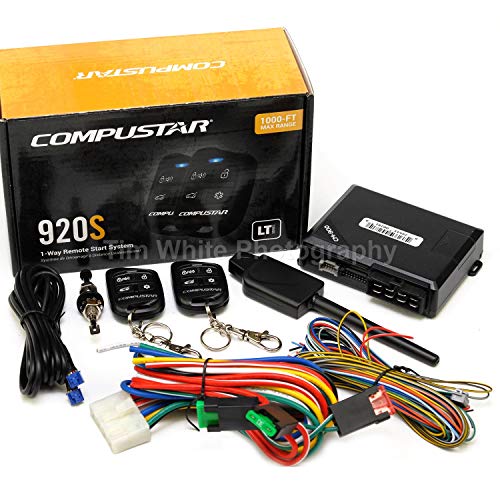
- 1500-ft max range for practical everyday use
- Two 1-way remotes with keyless entry and trunk pop
- BLADE-AL ready with CM900 module included
Best For: Chevy Blazer drivers who want a dependable, value-focused remote start kit for automatic vehicles.
Best for Long-Range Smartphone Control
Compustar RFX-2WT12-SS LTE Remote Start

- 3-mile 2-way LCD remote with confirmation alerts
- DroneMobile LTE enables phone control from anywhere
- GPS tracking and real-time notifications via app
Best For: Chevy Blazer drivers who want long-range remote start plus smartphone app control.
Best for Remote-Start Range
Compustar CS930-S Remote Start Bundle
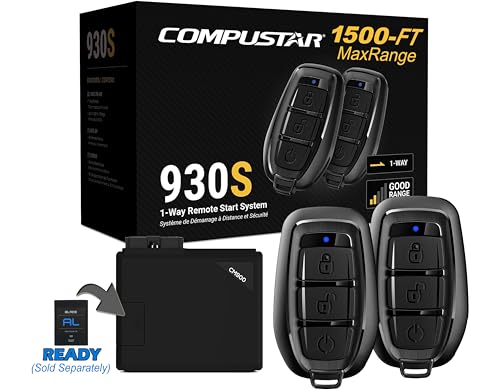
- 1,500-foot range for everyday remote start use
- Two 1-way remotes with lock, unlock, and start/stop
- iDatalink BLADE-AL ready for wider compatibility
Best For: Chevy Blazer owners who want a straightforward remote start and keyless entry bundle with solid range.
Best for Range
Compustar CS925S Remote Start System

- 1500-foot range with upgraded AP antenna
- Includes two 4-button remotes
- Simple, dependable remote-start setup
Best For: Chevy Blazer drivers who want a long-range, no-fuss remote start kit.
Best Easy-Install OEM Remote Start – Start-X for Chevy Blazer
If you want a practical smartphone remote starter for chevy blazer alternatives that keeps the factory key fob experience, the Start-X kit is built for push-to-start Chevy Blazer models from 2019–2022. It adds remote start without replacing your OEM remote, making it a strong choice for drivers who want a straightforward upgrade with minimal wiring.
Best For: Chevy Blazer owners who want an affordable, plug-and-play remote start upgrade using the factory key fob.
Pros:
- Plug-and-play T-harness helps avoid wire cutting and splicing
- Uses lock 3X on the factory remote, so no extra fob is needed
- Pre-flashed module and install video make DIY setup more approachable
- Works with Chevy Blazer push-to-start models from 2019–2022
Cons:
- Not compatible with key-start vehicles
- Requires a Windows PC for programming
- Vehicle shuts off when a door is opened, so you must restart before driving
For Blazer shoppers comparing add-on options, this Start-X kit stands out for keeping installation simple and costs down. It is not a full smartphone remote starter for chevy blazer, but it is a clean OEM-style solution if you mainly want reliable remote start from your existing key fob.
Best Smartphone Control – Compustar RFX-2WQ9-FM 2-Way LCD
If you want a smartphone remote starter for chevy blazer ownership that also adds visual confirmation, the Compustar RFX-2WQ9-FM is a strong upgrade kit. It pairs a 2-way color LCD remote with DroneMobile app access, giving you both traditional remote-start control and unlimited-range phone-based convenience.
Best For: Chevy Blazer drivers who want app control, GPS tracking, and 2-way status confirmation in one system upgrade.
Pros:
- DroneMobile module adds smartphone control and GPS tracking
- 2-way color LCD remote confirms lock, unlock, and start commands
- 3000-foot max range covers everyday parking situations well
- Good value if you want a remote upgrade kit with smart features
Cons:
- Requires compatible Compustar remote start/security hardware
- Installation is more involved than a basic plug-and-play remote
- One-year warranty is shorter than some competing electronics coverage
For shoppers comparing a smartphone remote starter for chevy blazer use, this Compustar bundle stands out because it combines app access with a reassuring 2-way LCD remote. It is especially appealing if you want both phone-based convenience and direct confirmation before you head out to the vehicle.
Best Cellular Range Pick – CARLINK ASCL6 Phone Remote Start Module
If you want a smartphone remote starter for chevy blazer that works beyond a short RF range, the CARLINK ASCL6 adds cellular control to a compatible aftermarket remote start or security system. It lets you start, lock, unlock, and check vehicle status from the app, with coverage limited mainly by cellular reception rather than distance.
Best For: Chevy Blazer owners with an existing compatible aftermarket remote start setup who want phone-based control and GPS-style convenience.
Pros:
- Works over cellular, so range is effectively much farther than standard RF remotes
- Supports remote start, lock/unlock, battery status, door status, and vehicle location
- First year of service is included, which lowers the upfront cost to try it
- Compatible with several popular VOXX, Code Alarm, Flash Logic, and Omega systems
Cons:
- Requires a compatible aftermarket remote start or security system already installed
- Not compatible with RF kits
- Service renews after the first year at an ongoing annual fee
As a smartphone remote starter for chevy blazer, this module makes the most sense when you already have the right hardware and want app-based convenience instead of a basic key fob extension. It is less of an all-in-one starter and more of a smart upgrade to an existing system.
Best for Long-Range Keyless Entry – Compustar RF 2WR3 FM Prime R3
If you want a dependable smartphone remote starter for chevy blazer setups, this Compustar PRIME kit is a strong fit for drivers who care more about range and simple control than extra app features. The 2-way, one-button remote gives you lock, unlock, start, and stop commands with confirmation feedback from up to 3000 feet away.
Best For: Chevy Blazer owners who want a compact, long-range remote starter and keyless entry solution with straightforward one-button use.
Pros:
- 2-way remote provides visual and audio confirmation after commands
- 3000-foot range is great for starting from inside the house or office
- Single-button design handles start, stop, lock, and unlock
- Small transmitter adds very little bulk to your keychain
Cons:
- Not a full smartphone app-based starter system by itself
- Installation may require professional integration for many vehicles
- Single-button control is simple, but not as feature-rich as multi-button remotes
For shoppers comparing a smartphone remote starter for chevy blazer options, this Compustar kit stands out for its strong range, compact remote, and reliable everyday convenience. It is a good choice if you want easy remote start and keyless entry without adding complexity.
Best for Easy Setup – MPC Smartphone Remote Start Kit for Chevy Equinox
If you want a smartphone remote starter for chevy blazer-style convenience with a factory-remote backup, this MPC kit is built around app control, plug-in installation, and vehicle-specific firmware. It’s designed for 2010-2017 Chevrolet Equinox models, so double-check fitment before buying if you’re cross-shopping for a Blazer or another GM SUV.
Best For: Drivers who want smartphone app control, factory-remote activation, and a plug-and-play install path with technical support.
Pros:
- Smartphone app lets you start, lock, unlock, and track the vehicle
- Uses a plug-in T-harness to reduce wiring compared with many remote start kits
- Includes preloaded firmware and USA-based tech support
- Works with the factory remote by pressing lock three times
Cons:
- Compatible with Chevrolet Equinox 2010-2017, not a direct Chevy Blazer kit
- Requires a Windows PC with USB port for setup
- App service after the 30-day trial requires a paid plan
For shoppers comparing a smartphone remote starter for chevy blazer use cases, this is a strong option if you prioritize app control and easier installation over universal compatibility. Just verify your exact vehicle before ordering, since this package is tuned for the Equinox platform.
Best for 2-Way Smartphone Control – Compustar RFX-P2WT13-SF PRO 3B LCD
If you want a feature-rich smartphone remote starter for chevy blazer use, the Compustar RFX-P2WT13-SF adds two-way confirmation, proximity unlock, and LTE app support through DroneMobile. It is not a complete remote start system on its own, but it is a strong upgrade kit for drivers who already have compatible Compustar hardware and want more control from the remote and phone.
Best For: Chevy Blazer owners who already have a compatible Compustar setup and want a 2-way remote with smartphone connectivity, GPS tracking, and proximity unlock.
Pros:
- 2-way LCD remote gives clear start/lock confirmation
- Includes LTE module for smartphone access and GPS features
- Water-resistant, USB-rechargeable remote with up to 3-mile range
- Proximity unlock adds a convenient hands-free entry feature
Cons:
- Not a full remote start system by itself
- Requires compatible Compustar components and installation
- Premium feature set may be more than casual users need
This is a smart pick if you are building out a smartphone remote starter for chevy blazer ownership and want app control plus a high-end physical remote. The value comes from the combination of long range, two-way feedback, and DroneMobile LTE support rather than from a simple plug-and-play starter kit.
Best Value Remote Start Bundle – Compustar CS920-S Remote Start System
Compustar CS920-S (920S) 1-Way Remote Start and Keyless Entry System with 1500-ft Range
Check Price On AmazonIf you want a practical smartphone remote starter for chevy blazer shoppers often compare against OEM options, the Compustar CS920-S is a solid value pick for automatic vehicles. It focuses on core remote-start and keyless-entry functions, adds 1500-ft range, and includes two easy-to-use 4-button remotes for everyday convenience.
Best For: Drivers who want a dependable, no-frills remote start and keyless entry bundle with strong range and straightforward daily use.
Pros:
- 1500-ft max range gives you plenty of parking-lot reach
- Includes two 1-way LED remotes with lock, unlock, start, and trunk pop
- BLADE-AL ready and built around the CM900 control module
- Good fit for buyers prioritizing value and reliability over app-based control
Cons:
- Professional installation is strongly recommended
- Some vehicles may need extra parts sold separately
- Automatic vehicles only, so it won’t suit manual transmissions
For Chevy Blazer owners who mainly want a dependable remote start upgrade, the CS920-S makes sense as a value-first option. It is not a smartphone remote starter for chevy blazer, but it does deliver the everyday convenience most drivers want without adding extra complexity.
Best for Long-Range Smartphone Control – Compustar RFX-2WT12-SS LTE Remote Start
If you want a smartphone remote starter for chevy blazer that also gives you true long-range RF backup, this Compustar bundle is a strong fit. The 2-way LCD remote confirms commands up to 3 miles away, while the DroneMobile LTE module adds app-based control when you’re nowhere near the vehicle.
Best For: Chevy Blazer owners who want both long-distance remote confirmation and smartphone control with GPS and alerts.
Pros:
- Up to 3-mile range with 2-way LCD confirmation
- DroneMobile LTE adds iOS and Android smartphone control
- GPS tracking and real-time alerts through the app
- Expandable with Compustar security accessories
Cons:
- Professional installation is strongly recommended
- Vehicle-specific bypass module is sold separately
- DroneMobile subscription is required for app features
For shoppers comparing a smartphone remote starter for chevy blazer, this model stands out because it blends dependable RF range with modern LTE access. It’s a better match if you value remote confirmation, tracking, and app control more than a simple basic starter.
Best for Remote-Start Range – Compustar CS930-S Remote Start Bundle
If you want a practical smartphone remote starter for chevy blazer, the Compustar CS930-S is a solid all-in-one option for drivers who need simple lock, unlock, and remote start functions with a strong 1,500-foot range. It is built for automatic-transmission vehicles and is a good fit when you want dependable remote-start capability without paying for a more advanced telematics package.
Best For: Chevy Blazer owners who want a straightforward remote start and keyless entry bundle with solid range and professional installation support.
Pros:
- 1,500-foot max range is useful for everyday remote starting from a distance
- Includes two 1-way 3-button remotes for lock, unlock, and start/stop control
- All-in-one remote start and keyless entry system simplifies the core setup
- iDatalink BLADE-AL ready for broader vehicle compatibility with the right bypass module
Cons:
- Professional installation is highly recommended
- Some vehicles may need extra parts sold separately
- Not a true smartphone-controlled system on its own
For shoppers comparing a smartphone remote starter for chevy blazer, this Compustar bundle makes more sense if you care more about reliable range and basic remote-start convenience than app-based control. Just factor in installation and any required bypass hardware before you buy.
Best for Range – Compustar CS925S Remote Start System
If you want a straightforward smartphone remote starter for chevy blazer ownership without jumping into a more complex security setup, the Compustar CS925S is a practical fit. It gives you two 1-way, 4-button remotes and an upgraded antenna for up to 1500 feet of range, so you can start the vehicle from a solid distance on cold mornings or hot afternoons.
Best For: Chevy Blazer drivers who want a simple, long-range remote start kit with basic everyday convenience.
Pros:
- Up to 1500-foot range with upgraded AP antenna
- Includes two 4-button remotes for shared use
- Simple remote-start-focused design
- Backed by Compustar’s established remote start platform
Cons:
- 1-way remotes only, so there’s no vehicle confirmation back to the fob
- Installation may require professional help depending on your Blazer trim
- Not a full smartphone-based control system out of the box
This is a strong pick if your priority is dependable remote starting rather than app control or advanced add-ons. For shoppers comparing a smartphone remote starter for chevy blazer options, the CS925S stands out for range, simplicity, and value-focused convenience.
How We Picked the Best Smartphone Remote Starter for Chevy Blazer
We focused on remote start systems that make sense for Chevy Blazer buyers: compatibility, ease of installation, smartphone support, signal range, and whether the kit fits push-to-start or key-to-start vehicles. For a Smartphone Remote Starter for Chevy Blazer, app control matters, but so do vehicle fitment and the quality of the module behind the app.
Quick Comparison
In simple terms, choose app-based systems if you want phone control from anywhere with cellular coverage, choose long-range RF remotes if you mainly want strong driveway-to-office range, and choose plug-and-play kits if you want to minimize install complexity. Some systems are all-in-one bundles, while others require a separate telematics module for smartphone access.
Key Buying Factors for a Smartphone Remote Starter for Chevy Blazer
Model Year and Ignition Type
Confirm your Blazer’s exact model year and whether it is push-to-start or key-to-start. Compatibility can change by trim and ignition style, and the wrong kit may require extra parts or professional rework.
Smartphone Control Vs. Remote Fob Control
If your priority is phone-based control, look for systems that support a cellular interface or LTE module. If you mostly want range and reliability from a physical remote, a strong RF system may be enough without app fees.
Range and Coverage
Published range is only one part of the story. RF remotes work within a specified distance, while smartphone control depends on cellular service and app setup. For many drivers, the best choice is the one that matches where they actually park and how far they need to start the vehicle from.
Installation Complexity
Some kits are designed for easier integration with plug-in harnesses, while others are more advanced and may be better handled by a professional installer. If you want the smoothest path, prioritize vehicle-specific kits and clear documentation.
Who Should Buy Which Smartphone Remote Starter for Chevy Blazer?
Buy a smartphone-enabled setup if you want app control, status updates, and the convenience of starting your vehicle from farther away. Choose a long-range remote system if you care more about dependable everyday use and fewer app-related variables. Go with a vehicle-specific plug-and-play style kit if you want a cleaner installation and better compatibility confidence for your Chevy Blazer.
For most shoppers, the best option is the one that balances fitment, control method, and installation effort rather than simply chasing the highest range claim.